• Solutions
    • E-storeTurn Your Idea
into a Thriving E-Store
    • POS (Point of Sales)Manage your Branches From One Dashboard
    • PaymentsReceive and Manage Payments with Ease
    • ShippingSmart Shipping Solutions
    • Inventory ManagementStreamline and track your inventory effortlessly
    • Zid VoiceRecover abandoned carts with a voice agent
    • Apps400+ Apps For Your Business Growth
    • ThemesCustomize Your Store, Your Way.
    • Mazeed MarketplaceDouble Your Sales and Get More Orders
    • FinancingFlexible Funding For Your Business Growth
    • Marketing ToolsTurn Your Store into a Customer Magnet
    • MarketplacesSold on Amazon and Trendyol and Jahez
    • ZID AssuranceBoost your customers' trust and increase purchase rates
    • Whatsapp
  • Pricing
  • Sectors
    • CoffeeFor roasteries and specialty coffee
    • Beauty & careFor beauty brands that turn heads
    • FoodFor dates, meat, nuts and every food brand
    • HoneyFor apiaries and specialty honey stores
  • Why Zid?
    • Why move to Zid?Join The Elite Merchants in the Market
    • Why start with Zid?Start Your Business From The Right Place
    • Why Expand with Zid?Expand with who Understands Your Needs
  • Use Cases

    Based on Business Size

    • Small BusinessYou've Got the Dream. We've Got the Launchpad.
    • Medium BusinessYou've Conquered Local. Now Let's Go Global.
    • Large BusinessHow Zid Empowers Commerce Leaders

    Based on Product

    • By Product Turn Your Ideas into Sales

    Based on Store Team

    • Store ManagerAll-in-one solutions for managing your store
    • Financial teamDetailed Reports from a Single Dashboard
    • Marketing TeamVersatile Marketing tools for Successful Campaigns
    • Operation teamEffortless Daily Operations from Anywhere

    Partners & Developers

    • Partners & DevelopersProvide Your Services to Thousands of Merchants
  • Resources

    Support

    • Help CenterMerchant Platform User Guide
    • Contact Sales TeamAnswer Your Questions About Zid Services

    Whats New?

    • BlogStay Updated With All The Latest in E-commerce

    Merchant Enablement

    • Merchants EnablementA Team Ready to Empower Your Growth
    • Merchants CommunityJoin Merchants Who Understand Your Ambitions
    • Zid AcademyLearn The Latest E-commerce Strategies

    ZID's Library

    • Zid ReportsEverything you need to know about the market
    • Zid GuidesComprehensive guides for starting and growing in e-commerce
  • Switch to ZID
    • ZID x Salla
    • ZID x Shopify
    • ZID x OpenCart
    • ZID x Magento
    • ZID x Wordpress
  • Enterprise
  • AR
  • Login
  • Create a store
The question ambassadors ask us most

How do I find merchants?

24 ideas that start in group chats, at bazaars and even with your current clients. Learn where to find the right merchant, what to say, and how to give them 20% off from you.

Work out your incomeWhere do I find merchants?

20%

A discount for your merchant, from you

On eligible Zid plans, monthly or annual, when they subscribe through your landing page

Your commission on the subscription
30%
Credited to you on every order
1SAR
Where do I find merchants?When do I reach out?What do I say?How do I share my page?How do I answer?How much do I earn?First-month plan
Before we start

The usual advice is your base. These ideas build on it

Sharing your link and making content are important steps, and they work. This guide adds the tricks pros use that few people talk about.

The usual advice

  • Share your link on your accounts

  • Post content daily and use hashtags

  • Send the link to everyone you know

  • Explain the platform's features

VS

On top of that: this guide's ideas

  • One word in a bio that points you to a ready merchant

  • The month to reach a merchant before the rush

  • One question that lets the merchant convince themselves

  • How to get others to bring you merchants

What you have as an ambassador

Know what you're holding before you talk

These are your tools in every conversation. And the point that changes how you think: a merchant isn't a one-off deal. You earn a commission on their subscription, and 1 SAR is credited to you on every order their store makes.

  • 30%

    Commission on the subscription

    On the merchant's new subscription. Annual: Rise SAR 207, Growth SAR 624, Professional SAR 4,174.

  • 1SAR

    On every order

    You earn 1 SAR for every order made by a store that took out a new Zid subscription through your Safeer page. It counts from the first order; your balance builds up and is paid out once it reaches the payout threshold.

  • 20%

    20% off, from you

    Give the merchant a reason to subscribe through your page: 20% off eligible monthly and annual plans.

How much could you earn with Zid Safeer?

Plan

Number of stores

Estimated total commission

10,330 SAR

Estimates of the commission on new annual subscriptions under the Zid Safeer programme terms. The order bonus counts from the first order; your balance builds up and is paid out once it reaches the payout threshold.

Join Zid Safeer(opens in a new tab)
Ideas 1 to 7

Where are the merchants hiding?

There are more merchants around you than you think; you just need to know where to look. Open each place: what you notice, and what you do.

01 Search for “order on WhatsApp”

You notice: You see an Instagram or TikTok account whose bio says “order on WhatsApp”, with comments like “How much?” and “How do I order?” under its posts. What you do: Ask: “How do you keep track of the orders you get here?” If they say orders are split between DMs and WhatsApp, show them how to bring them into one store. If they ask about plans, send your page and tell them they get 20% off eligible plans from you. Try searching: “to order”, “home business”, “handmade”.

02 Bazaars and exhibitions

You notice: The stall owner tells customers “Follow us on Instagram and order by DM”, or writes orders down on paper. What you do: Buy something and ask: “Where can I order from you after the show?” If they say by DM, explain that a store lets customers order and pay on their own. Show them the QR code on your phone so they can scan it and see the plans and your 20% discount.

03 Home-business and entrepreneur groups

You notice: Someone in the group asks: “How do I organise the orders I get by DM?” What you do: Answer the question about organising orders first. If they say orders are scattered across chats, show them how to bring them into one store. If they ask about plans, send your page and tell them they get 20% off eligible plans from you.

04 Neighbouring partners

You notice: A designer or product photographer tells you: “I have a client who wants to open a store but can't pick a platform.” What you do: Agree to swap: they send you anyone who wants a store, and you refer anyone who needs design or photos to them. Give them a ready message with your page link to send their client, and the client gets 20% off from you.

05 People who just went official

You notice: A merchant posts: “Finally got my freelance licence” or “Finally, the commercial registration.” What you do: Congratulate them and ask: “What's next? Selling on Instagram or a store?” If they're thinking about a store, send your page and tell them they get 20% off eligible plans from you.

06 Struggling stores

You notice: You see comments on a store like “The payment didn't go through” or “Where's my parcel?”, or its site is slow to load. What you do: Don't criticise their platform. Ask: “I noticed customers asking about shipping. How do you track it now?” If they complain, show them how to track orders and shipping from a Zid store, and send your page if they want to see the plans.

07 Your current clients

You notice: A merchant who subscribed through you says “Orders got easier”, or makes their first big sales. What you do: Ask: “Do you know anyone who sells like you and is tired of taking orders by DM?” Give them a ready message with your page link to send, and their friend gets 20% off from you.

Ideas 8 to 11

Timing matters more than words

The same message gets turned down today and accepted a month later. Here are 4 moments when a merchant is ready to listen.

08

A month before the season

You notice: A sweets seller asks in the group: “When should I start getting ready for Ramadan?”

What you do: Suggest she sets up her store a month before the rush, and send her your page to see the plans and your 20% discount.

09

When they complain

You notice: A merchant writes: “I'm tired of answering DMs.”

What you do: Start with empathy: “I get it, it takes the whole day.” Then ask how many orders they get a day, and show how a store takes them without replying to each one.

10

After a win

You notice: A merchant posts: “Sold out” or “Orders beyond expectations.”

What you do: Congratulate them and ask: “What would you do if orders doubled?” If they say they couldn't keep up, offer your page.

11

Starting out

You notice: Someone tells you: “I'm planning to start selling from home.”

What you do: Help them plan the start: what to sell and to whom. Then share your page so they can see the plans and pick the one that fits their size, with 20% off from you.

Season calendar: when to move

Reach the merchant a month before the season, while they're planning, not during the rush. The highlighted one is the nearest season right now.

Founding Day

22 February

Reach out in January

Traditional clothing and accessories

Ramadan and Eid

Per the Hijri calendar

Reach out a month before

Sweets, abayas, perfumes and gifts

Summer and travel

June to August

Reach out in April and May

Travel essentials and summer clothing

Back to school

August

Reach out in July

Stationery, bags and clothing

National Day

23 September

Reach out in August

Gifts, prints and clothing

White Friday

November

Reach out in October

Almost every store

Ideas 12 to 19

Words that convince

A smart ambassador doesn't open with “I have an offer for you”. They start with a question about the merchant and how they work, then recommend what fits.

12

Ask before you pitch

“How do you take orders now?” Their answer decides what you tell them.

13

Make the discount clear

“Through my Safeer page you get 20% off any plan, monthly or annual” beats “Sign up with my link”.

14

Make the next step clear

End every chat with one step: “Open my page, look at the plans and pick the one that suits you.”

15

Sell the benefit

“Shipments are booked and tracked from your store, no calls to the courier” beats “We have Zid logistics”.

16

Your first line is about them

A note about their business, then the result they care about, then one step.

17

Ask by description

“Do you know anyone who sells from home and takes orders on WhatsApp?”

18

Make it easy to refer you

Give them a ready message they can copy and send in seconds.

19

Let your landing page explain

Share your Safeer landing page, where the merchant sees the plans and picks the one that suits them. The short link is for messages and bios; the QR code for print and events.

Ready messages: add your details and copy

S

Message preview

Situation: She told you she takes her orders by DM

Hi Sarah 👋 You said your orders come in by DM. How do you keep track of them now? If it's eating your time, a Zid store lets your customers order and pay in the store. And through my Safeer page you can see the plans and get 20% off any plan you choose, monthly or annual: [your page link]

The name is an example; the link is your Safeer landing page link.

Bonus idea

A QR code for your landing page

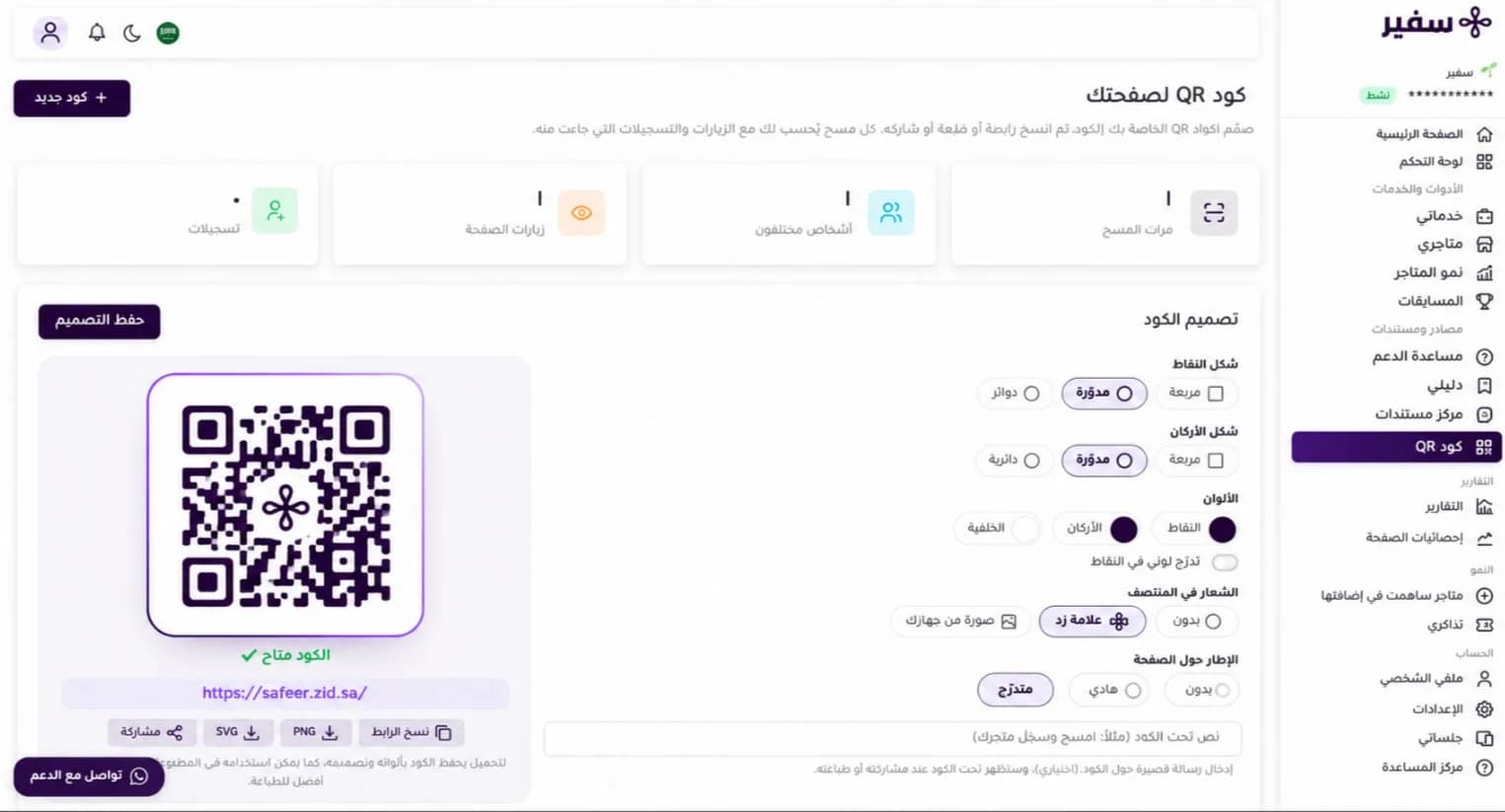
In the Safeer portal you can create a custom QR code for your landing page. The merchant scans it with their phone camera and goes straight to your page to learn about Zid and sign up. Share it online or put it in print.

Your landing page

A page in your name where the merchant learns about Zid and sees the plans. Share it as a short link on WhatsApp, or show its QR code at an event or on a video podcast.

In the Safeer portal you design your landing page's QR code, copy its link or download it as PNG or SVG, and track scans, visits and sign-ups.

The QR code page in the Safeer portal: scans, people, visits and sign-ups, with the code design and the landing page link

From creating it to tracking it

Five steps in the Safeer portal:

  • Where to find it: log in to the Zid Safeer portal and open the landing page QR code option from the dashboard.
  • Customise it: dot shape, corner shape, colours, a logo in the middle, and the frame.
  • Test it before you share it: scan it with your phone camera and make sure it reaches your landing page before you share or print it.
  • Where to use it: business cards and brochures, events and meetings with merchants, presentations, and marketing images and designs.
  • Track it: scans, unique users, page visits, and sign-ups linked to the code.

In short: customise the code, test it before sharing, and track scans, visits and sign-ups to see where it works best.

Log in to Zid Safeer(opens in a new tab)

Your page's QR code

248Scans
196Unique people
173Page visits
12Sign-ups

Code available

https://safeer.zid.sa/
Copy linkPNGSVGShare
Ready replies

When the merchant says “but…”

An objection isn't a no. It usually means the merchant is interested and still has a question you haven't answered.

“It's expensive”

Zid has plans for every stage, and paid plans start at SAR 99 a month: “Rise” for those starting out, “Growth” at 299 for growing orders, and “Professional” for large stores. Through your page they get 20% off eligible monthly and annual plans. Then ask: “How many orders do you lose because you didn't reply in time?” so they compare the price with what they're losing.

“I sell fine on WhatsApp”

WhatsApp stays with them, only stronger. On Zid they get a complete store, with Zid WhatsApp built into their store dashboard: it sends order alerts and abandoned-cart reminders automatically from their verified number, and an auto-reply tree answers customers even after hours. It's like having a salesperson working for them, fully automated. They can also connect their WhatsApp Business number and work from their phone and the Zid dashboard at the same time.

“I don't have time to build a store”

Tell them Zid's onboarding takes less than 5 minutes, and Zid AI helps with everything: it writes product descriptions, edits photo backgrounds, designs the logo and banners, and checks the store with a score and improvement ideas. Their store also connects to Amazon, Trendyol and Jahez. And if they want someone to set it all up, you can offer the service yourself or with a partner you trust, and earn from the service and from their subscription.

“I'm on another platform”

Never talk about the other platform. Ask: “Are you happy with it? What do you wish was easier?” If they're happy, respect their choice; if something bothers them, that's your way in.

“Why should I sign up through you?”

An honest answer: “Because you get 20% off any Zid plan through my Safeer page, and I'm a Zid ambassador who earns from this referral. If you ever need anything, I'm here.” Transparency builds trust.

Ideas 20 to 24

What comes after sign-up is the real income

Most marketers stop here, and this is exactly where your balance grows: every order the store makes credits you 1 SAR.

20

Help them succeed

A merchant whose orders grew by 300 = 300 more SAR credited to you. A tip about a seasonal campaign pays you back.

21

Follow up after they see the plans

Once they've opened your landing page and seen the plans, ask: “Which plan caught your eye? Want me to explain the difference?” and remind them the 20% covers monthly and annual.

22

Close the loop

When someone refers a merchant to you and they sign up, go back and tell them. People who see their referral work refer again.

23

Ask for referrals after the first win

The best time to ask a merchant about their friends is after their first big sales. That's when they talk about it with enthusiasm.

24

Remind them of the next season

Send them an offer or campaign idea a month before the season. Every extra order they get credits you 1 SAR.

Diagnose your numbers in the Safeer portal

What do you see in the portal?

Pick the situation that looks like your numbers, and we'll tell you what to do.

Put the ideas to work

Your first 30 days

Half an hour a day is enough. Tick off what you've done; your progress is saved on your device.

0 of 15 tasks done

Week 1: Get ready

Week 1: Get ready

Week 2: People close to you

Week 2: People close to you

Week 3: Widen your circle

Week 3: Widen your circle

Week 4: Follow up and improve

Week 4: Follow up and improve

Suggested goal for the first month

3 paid subscriptions

Along the way, track visits and sign-ups in the Safeer portal so you know where to improve.

Their growth starts with you, and so does yours

With Zid Safeer, everyone wins

A successful ambassador isn't the one who knows the most people. It's the one who knows where to look, when to speak and what to say. And every merchant who subscribes through your page brings a commission on their subscription, 1 SAR credited to you on every order they make, and a reputation that brings you the next merchant.

Join Zid Safeer(opens in a new tab)

Solutions

  • E-store
  • POS (Point of Sales)
  • Payments
  • Shipping
  • Inventory Management
  • Apps
  • Themes
  • Mazeed Marketplace
  • Financing
  • Marketing Tools

Why Zid

  • Why start with Zid?
  • Why move to Zid?
  • Why Expand with Zid?
  • Pricing

How Zid Serves You

  • Small Business
  • Medium Business
  • Large Business
  • Enterprise
  • By Product
  • Store Manager
  • Financial team
  • Operation team
  • Marketing Team
  • Partners & Developers

Resources

  • Merchants Enablement
  • Merchants Community
  • Blog
  • Zid Academy
  • Brand Guidelines

Support

  • Help Center
  • What's New
  • Terms & Conditions
  • Privacy Policy
  • Zid Stores' Customer Complaints

ZID is available in

Saudi ArabiaUnited Arab EmiratesKuwaitOmanBahrainEgyptSyria
App StoreGoogle Play
عربي (AR)

Al-Qudrah Al-Taqniyah for Technology and Communication Company

Commercial Registration Number 1010365366

VAT Number 300827827900003